

See also
A Jupyter notebook version of this tutorial can be downloaded here.
Operations and qubits#
Gates, measurements and qubits#
In the previous tutorials, experiments were created on the quantum-device level. On this level, operations are defined in terms of explicit signals and locations on the chip, rather than the qubit and the intended operation. To work at a greater level of abstraction, qblox-scheduler allows creating operations on the
quantum-circuit level. Instead of signals, clocks, and ports, operations are defined by the effect they have on specific qubits. This representation of the schedules can be compiled to the quantum-device level to create the pulse schemes.
In this tutorial we show how to define operations on the quantum-circuit level, combine them into schedules, and show their circuit-level visualization. We go through the configuration file needed to compile the schedule to the quantum-device level and show how these configuration files can be created automatically and dynamically.
Many of the gates used in the circuit layer description are defined in qblox_scheduler.operations.gate_library such as qblox_scheduler.operations.gate_library.Reset, qblox_scheduler.operations.gate_library.X90 and qblox_scheduler.operations.gate_library.Measure. Operations are instantiated by providing them with the name of the qubit(s) on which they operate:
[1]:
from qblox_scheduler.operations import CZ, X90, Measure, Reset

q0, q1 = ("q0", "q1")
X90(q0)
Measure(q1)
CZ(q0, q1)
Reset(q0)
/.venv/lib/python3.14/site-packages/quantify_core/utilities/general.py:13: QCoDeSDeprecationWarning: The `qcodes.utils.helpers` module is deprecated. Please consult the api documentation at https://microsoft.github.io/Qcodes/api/index.html for alternatives.
  from qcodes.utils.helpers import NumpyJSONEncoder
[1]:
{'name': 'Reset q0', 'gate_info': {'unitary': None, 'tex': '$|0\\rangle$', 'plot_func': 'qblox_scheduler.schedules._visualization.circuit_diagram.reset', 'device_elements': ['q0'], 'operation_type': 'reset', 'device_overrides': {}}, 'pulse_info': {}, 'acquisition_info': {}, 'logic_info': {}, 'statement_info': {}}
Within a single qblox_scheduler.schedules.schedule.Schedule, high-level circuit layer operations can be mixed with quantum-device level operations. This mixed representation is useful for experiments where some pulses cannot easily be represented as qubit gates. An example of this is given by the Chevron experiment given in Mixing pulse and circuit layer operations.
Circuit layer schedule example: Bell test#
We demonstrate the extra layer of abstraction that circuit-level operations offer by creating a qblox_scheduler.schedules.schedule.Schedule for measuring Bell violations.
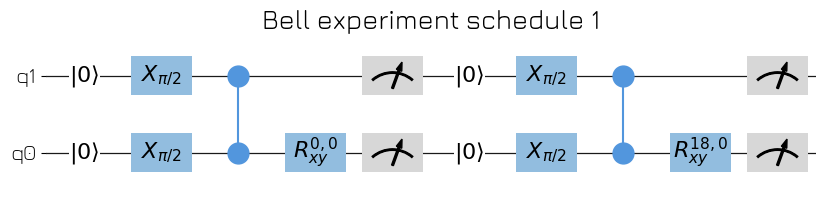
As the first example, we want to create a schedule for performing the Bell experiment. The goal of the Bell experiment is to create a Bell state \(|\Phi ^+\rangle=\frac{1}{2}(|00\rangle+|11\rangle)\) which is a perfectly entangled state, followed by a measurement. By rotating the measurement basis, or equivalently one of the qubits, it is possible to observe violations of the CSHS inequality.
We create this experiment using the quantum-circuit level description. This allows defining the Bell schedule as:
[2]:
import numpy as np

from qblox_scheduler import Schedule
from qblox_scheduler.operations import CZ, X90, Measure, Reset, Rxy

sched = Schedule("Bell experiment")

for acq_idx, theta in enumerate(np.linspace(0, 360, 21)):
    sched.add(Reset(q0, q1))
    sched.add(X90(q0))
    sched.add(X90(q1), ref_pt="start")  # Start at the same time as the other X90
    sched.add(CZ(q0, q1))
    sched.add(Rxy(theta=theta, phi=0, qubit=q0))

    sched.add(Measure(q0, acq_index=acq_idx), label=f"M q0 {theta:.2f} deg")
    sched.add(
        Measure(q1, acq_index=acq_idx),
        label=f"M q1 {theta:.2f} deg",
        ref_pt="start",  # Start at the same time as the other measure
    )

sched
[2]:
<qblox_scheduler.schedule.Schedule at 0x7fd3fdbfb620>
Visualizing the quantum circuit#
We can directly visualize the created schedule on the quantum-circuit level with the qblox_scheduler.schedules.schedule.ScheduleBase.plot_circuit_diagram method. This visualization shows every operation on a line representing the different qubits.
[3]:
import matplotlib.pyplot as plt

_, ax = sched.plot_circuit_diagram()
# all gates are plotted, but it doesn't all fit in a matplotlib figure.
# Therefore we use :code:`set_xlim` to limit the number of gates shown.
ax.set_xlim(-0.5, 9.5)
plt.show()
In previous tutorials, we visualized the schedules on the pulse level using qblox_scheduler.schedules.schedule.ScheduleBase.plot_pulse_diagram . Up until now, however, all gates have been defined on the quantum-circuit level without defining the corresponding pulse shapes. Therefore, trying to run qblox_scheduler.schedules.schedule.ScheduleBase.plot_pulse_diagram will raise an error which signifies no pulse_info is present in the schedule:
[4]:
sched.plot_pulse_diagram()
---------------------------------------------------------------------------
KeyError                                  Traceback (most recent call last)
Cell In[4], line 1
----> 1 sched.plot_pulse_diagram()

File /.venv/lib/python3.14/site-packages/qblox_scheduler/schedule.py:462, in Schedule.plot_pulse_diagram(self, port_list, sampling_rate, modulation, modulation_if, plot_backend, x_range, combine_waveforms_on_same_port, timeable_schedule_index, **backend_kwargs)
    460         raise IndexError(f"No timeable schedule at index {timeable_schedule_index}")
    461     timeable_schedule = timeable_schedules[timeable_schedule_index]
--> 462 return timeable_schedule.plot_pulse_diagram(
    463     port_list,
    464     sampling_rate,
    465     modulation,
    466     modulation_if,
    467     plot_backend,
    468     x_range,
    469     combine_waveforms_on_same_port,
    470     **backend_kwargs,
    471 )

File /.venv/lib/python3.14/site-packages/qblox_scheduler/schedules/schedule.py:440, in TimeableScheduleBase.plot_pulse_diagram(self, port_list, sampling_rate, modulation, modulation_if, plot_backend, x_range, combine_waveforms_on_same_port, **backend_kwargs)
    436 # NB imported here to avoid circular import
    438 from qblox_scheduler.schedules._visualization.pulse_diagram import sample_schedule
--> 440 sampled_pulses_and_acqs = sample_schedule(
    441     self,
    442     sampling_rate=sampling_rate,
    443     port_list=port_list,
    444     modulation=modulation,
    445     modulation_if=modulation_if,
    446     x_range=x_range,
    447     combine_waveforms_on_same_port=combine_waveforms_on_same_port,
    448 )
    450 if plot_backend == "mpl":
    451     # NB imported here to avoid circular import
    453     from qblox_scheduler.schedules._visualization.pulse_diagram import (
    454         pulse_diagram_matplotlib,
    455     )

File /.venv/lib/python3.14/site-packages/qblox_scheduler/schedules/_visualization/pulse_diagram.py:529, in sample_schedule(schedule, port_list, modulation, modulation_if, sampling_rate, x_range, combine_waveforms_on_same_port)
    526 acq_infos: dict[str, list[ScheduledInfo]] = defaultdict(list)
    527 marker_infos: dict[str, list[ScheduledInfo]] = defaultdict(list)
--> 529 _extract_schedule_infos(
    530     schedule,
    531     port_list,
    532     0,
    533     offset_infos,
    534     pulse_infos,
    535     acq_infos,
    536     marker_infos,
    537 )
    539 x_min, x_max = x_range
    541 sampled_pulses = get_sampled_pulses_from_voltage_offsets(
    542     schedule=schedule,
    543     offset_infos=offset_infos,
   (...)    547     modulation_if=modulation_if,
    548 )

File /.venv/lib/python3.14/site-packages/qblox_scheduler/schedules/_visualization/pulse_diagram.py:409, in _extract_schedule_infos(operation, port_list, time_offset, offset_infos, pulse_infos, acq_infos, marker_infos)
    407     for schedulable in operation.schedulables.values():
    408         inner_operation = operation.operations[schedulable["operation_id"]]
--> 409         abs_time = schedulable["abs_time"]
    410         _extract_schedule_infos(
    411             inner_operation,
    412             port_list,
   (...)    417             marker_infos,
    418         )
    419 elif isinstance(operation, ConditionalOperation):

File /usr/local/lib/python3.14/collections/__init__.py:1148, in UserDict.__getitem__(self, key)
   1146 if hasattr(self.__class__, "__missing__"):
   1147     return self.__class__.__missing__(self, key)
-> 1148 raise KeyError(key)

KeyError: 'abs_time'
And similarly for the timing_table:
[5]:
sched.timing_table
---------------------------------------------------------------------------
ValueError                                Traceback (most recent call last)
Cell In[5], line 1
----> 1 sched.timing_table

File /.venv/lib/python3.14/site-packages/qblox_scheduler/schedule.py:566, in Schedule.timing_table(self)
    564 if timeable_schedule is None:
    565     raise ValueError("can not plot timing table for schedules with untimed operations")
--> 566 return timeable_schedule.timing_table

File /.venv/lib/python3.14/site-packages/qblox_scheduler/schedules/schedule.py:630, in TimeableScheduleBase.timing_table(self)
    536 """
    537 A styled pandas dataframe containing the absolute timing of pulses and acquisitions in a schedule.
    538
   (...)    627
    628 """  # noqa: E501
    629 timing_table_list = []
--> 630 self._generate_timing_table_list(self, 0, timing_table_list, None)
    631 timing_table = pd.concat(timing_table_list, ignore_index=True)
    632 timing_table = timing_table.sort_values(by="abs_time")

File /.venv/lib/python3.14/site-packages/qblox_scheduler/schedules/schedule.py:490, in TimeableScheduleBase._generate_timing_table_list(cls, operation, time_offset, timing_table_list, operation_id)
    487     for schedulable in operation.schedulables.values():
    488         if "abs_time" not in schedulable:
    489             # when this exception is encountered
--> 490             raise ValueError(
    491                 "Absolute time has not been determined yet. Please compile your schedule."
    492             )
    493         cls._generate_timing_table_list(
    494             operation.operations[schedulable["operation_id"]],
    495             time_offset + schedulable["abs_time"],
    496             timing_table_list,
    497             schedulable["operation_id"],
    498         )
    499 elif isinstance(operation, LoopOperation):

ValueError: Absolute time has not been determined yet. Please compile your schedule.
Quantum devices and elements#
The device configuration contains all knowledge of the physical device under test (DUT). To generate these device configurations on the fly, qblox-scheduler provides the qblox_scheduler.device_under_test.quantum_device.QuantumDevice and qblox_scheduler.device_under_test.device_element.DeviceElement classes.
These classes contain the information necessary to generate the device configs and allow changing their parameters on-the-fly. The qblox_scheduler.device_under_test.quantum_device.QuantumDevice class represents the DUT containing different qblox_scheduler.device_under_test.device_element.DeviceElement s. Currently, qblox-scheduler contains the qblox_scheduler.device_under_test.transmon_element.BasicTransmonElement class to represent a fixed-frequency transmon qubit connected to a
feedline. We show their interaction below:
[6]:
from qblox_scheduler import BasicTransmonElement, QuantumDevice

# First create a device under test
dut = QuantumDevice("DUT")

# Then create a transmon element
qubit = BasicTransmonElement("qubit")

# Finally, add the transmon element to the QuantumDevice
dut.add_element(qubit)
dut, dut.elements
[6]:
(QuantumDevice(name='DUT', elements={'qubit': BasicTransmonElement(name='qubit', element_type='BasicTransmonElement', reset=IdlingReset(name='reset', duration=0.0002), rxy=RxyDRAG(name='rxy', amp180=nan, beta=0.0, duration=2e-08, reference_magnitude=ReferenceMagnitude(name='reference_magnitude', dBm=nan, V=nan, A=nan)), measure=DispersiveMeasurement(name='measure', pulse_type='SquarePulse', pulse_amp=0.25, pulse_duration=3e-07, acq_channel=0, acq_delay=0.0, integration_time=1e-06, reset_clock_phase=True, acq_weights_a=array([], dtype=float64), acq_weights_b=array([], dtype=float64), acq_weights_sampling_rate=1000000000.0, acq_weight_type='SSB', acq_rotation=0.0, acq_threshold=0.0, num_points=1, reference_magnitude=ReferenceMagnitude(name='reference_magnitude', dBm=nan, V=nan, A=nan)), pulse_compensation=PulseCompensationModule(name='pulse_compensation', max_compensation_amp=nan, time_grid=nan, sampling_rate=nan), ports=Ports(name='ports', microwave='qubit:mw', flux='qubit:fl', readout='qubit:res'), clock_freqs=ClocksFrequencies(name='clock_freqs', f01=nan, f12=nan, readout=nan))}, edges={}, instr_instrument_coordinator=None, cfg_sched_repetitions=1024, keep_original_schedule=True, hardware_config=None, scheduling_strategy=<SchedulingStrategy.ASAP: 'asap'>),
 {'qubit': BasicTransmonElement(name='qubit', element_type='BasicTransmonElement', reset=IdlingReset(name='reset', duration=0.0002), rxy=RxyDRAG(name='rxy', amp180=nan, beta=0.0, duration=2e-08, reference_magnitude=ReferenceMagnitude(name='reference_magnitude', dBm=nan, V=nan, A=nan)), measure=DispersiveMeasurement(name='measure', pulse_type='SquarePulse', pulse_amp=0.25, pulse_duration=3e-07, acq_channel=0, acq_delay=0.0, integration_time=1e-06, reset_clock_phase=True, acq_weights_a=array([], dtype=float64), acq_weights_b=array([], dtype=float64), acq_weights_sampling_rate=1000000000.0, acq_weight_type='SSB', acq_rotation=0.0, acq_threshold=0.0, num_points=1, reference_magnitude=ReferenceMagnitude(name='reference_magnitude', dBm=nan, V=nan, A=nan)), pulse_compensation=PulseCompensationModule(name='pulse_compensation', max_compensation_amp=nan, time_grid=nan, sampling_rate=nan), ports=Ports(name='ports', microwave='qubit:mw', flux='qubit:fl', readout='qubit:res'), clock_freqs=ClocksFrequencies(name='clock_freqs', f01=nan, f12=nan, readout=nan))})
The different transmon properties can be set through attributes of the qblox_scheduler.device_under_test.transmon_element.BasicTransmonElement class instance, e.g.:
[7]:
qubit.clock_freqs.f01 = 6e9
Mixing pulse and circuit layer operations#
We can mix the circuit layer representation with pulse-level operations, which can be useful for experiments involving pulses not easily represented by gates.
[8]:
from qblox_scheduler import ClockResource, Schedule
from qblox_scheduler.operations import X90, Measure, Reset, SquarePulse, X

sched = Schedule("Experiment with both pulse and circuit layer operations")

reset = sched.add(Reset("q0"))
sched.add(X("q0"), ref_op=reset, ref_pt="end")  # Start at the end of the reset
# We specify a clock for tutorial purposes
square = sched.add(SquarePulse(amplitude=0.1, duration=1e-6, port="q0:mw", clock="q0.01"))
sched.add(Measure(q0, coords={"amplitude": 0.1}, acq_channel="S_21"), label="M q0")

# Specify the frequencies for the clocks; this can also be done via the DeviceElement (BasicTransmonElement) instead
sched.add_resources(
    [
        ClockResource("q0.01", 6.02e9),
        ClockResource("q0.ro", 5.02e9),
    ]
)
[9]:
sched.plot_circuit_diagram()
[9]:
(<Figure size 1000x100 with 1 Axes>,
 <Axes: title={'center': 'Experiment with both pulse and circuit layer operations schedule 1'}>)

This example shows that we add gates using the same interface as pulses. Gates are Operations, and as such support the same timing and reference operators as Pulses.
Schedule compilation with the HardwareAgent#
The HardwareAgent is responsible for instantiating everything that is necessary to run an experiment, as well as actually running the experiment. A hardware configuration is required, but a device configuration is not. The Compiling to Hardware section demonstrates how to set the hardware configuration.
[10]:
from qblox_scheduler import BasicTransmonElement, HardwareAgent, QuantumDevice

dut.close()
dut = QuantumDevice("DUT")
q0_dev = BasicTransmonElement("q0")
q1_dev = BasicTransmonElement("q1")
dut.add_element(q0_dev)
dut.add_element(q1_dev)
dut.get_element("q0").clock_freqs.f01 = 4e9
dut.get_element("q0").rxy.amp180 = 0.65
dut.get_element("q1").rxy.amp180 = 0.55
dut.get_element("q0").measure.pulse_amp = 0.28
dut.get_element("q1").measure.pulse_amp = 0.22

agent = HardwareAgent("./dependencies/configs/hw_cfg.json", dut)

compiled_sched = agent.compile(schedule=sched)
/tmp/ipykernel_14492/408239406.py:3: UserWarning: QuantumDevice is not an instrument, no need to close it!
  dut.close()
/.venv/lib/python3.14/site-packages/qblox_scheduler/qblox/hardware_agent.py:421: UserWarning: failed to connect the cluster to the hardware before compilation, several attributes such as `compiled_operations` will not be available! (cause: timed out)
  warnings.warn(
/.venv/lib/python3.14/site-packages/qblox_scheduler/backends/circuit_to_device.py:440: RuntimeWarning: Clock 'q0.01' has conflicting frequency definitions: 6020000000.0 Hz in the schedule and 4000000000.0 Hz in the device config. The clock is set to '6020000000.0'. Ensure the schedule clock resource matches the device config clock frequency or set the clock frequency in the device config to np.NaN to omit this warning.
  warnings.warn(
So, finally, we can show the timing table associated with the Chevron schedule and plot its pulse diagram:
[11]:
compiled_sched.timing_table.hide(slice(11, None), axis="index").hide(
    "waveform_op_id", axis="columns"
)
[11]:
| port | clock | abs_time | duration | is_acquisition | operation | operation_hash | |
|---|---|---|---|---|---|---|---|
| 0 | None | cl0.baseband | 0.0 ns | 200,000.0 ns | False | Reset('q0') | -2857398898682557538 |
| 1 | q0:mw | q0.01 | 200,000.0 ns | 20.0 ns | False | X(qubit='q0') | -492722233937526341 |
| 2 | q0:mw | q0.01 | 200,020.0 ns | 1,000.0 ns | False | SquarePulse(amplitude=0.1,duration=1e-06,port='q0:mw',clock='q0.01',reference_magnitude=None,t0=0.0) | -4022740834352888800 |
| 3 | None | q0.ro | 201,020.0 ns | 0.0 ns | False | ResetClockPhase(clock='q0.ro',t0=0.0) | 3753979834188855897 |
| 4 | q0:res | q0.ro | 201,020.0 ns | 300.0 ns | False | SquarePulse(amplitude=0.28,duration=3e-07,port='q0:res',clock='q0.ro',reference_magnitude=None,t0=0.0) | -8287514057780766071 |
| 5 | q0:res | q0.ro | 201,020.0 ns | 1,000.0 ns | True | SSBIntegrationComplex(port='q0:res',clock='q0.ro',duration=1e-06,acq_channel='S_21',coords={'amplitude': 0.1},acq_index=None,bin_mode='average_append',phase=0,t0=0.0) | -7514949733932530333 |
[12]:
f, ax = compiled_sched.plot_pulse_diagram(x_range=(200e-6, 200.4e-6))

Overriding device parameters on circuit-level operations#
The Qblox-scheduler compiler has an additional feature which adds more low-level control for users how a circuit-level operation is compiled to device-level. It is possible to override the parameters of the DeviceElement using the device_overrides keyword argument in each circuit-level operation.
For example, to override the DRAG parameter beta:
[13]:
pulse_duration = 1e-6
q0_dev.rxy.beta = 0.5 * pulse_duration / 8
Let’s create, compile and show it on an actual schedule.
[14]:
from qblox_scheduler import HardwareAgent
from qblox_scheduler.operations import IdlePulse
from qblox_scheduler.operations.loop_domains import DType, linspace

agent = HardwareAgent("./dependencies/configs/hw_cfg.json", "./dependencies/configs/dev_cfg.json")
sched = Schedule("X train")
beta = 1e-9

with sched.loop(linspace(start=-1, stop=1, num=10, dtype=DType.AMPLITUDE)) as amp:
    sched.add(IdlePulse(duration=30e-9))
    sched.add(X("q0", amp180=amp, beta=beta))

compiled_sched = agent.compile(schedule=sched)
/.venv/lib/python3.14/site-packages/qblox_scheduler/qblox/hardware_agent.py:421: UserWarning: failed to connect the cluster to the hardware before compilation, several attributes such as `compiled_operations` will not be available! (cause: timed out)
  warnings.warn(
[15]:
f, ax = compiled_sched.plot_pulse_diagram(x_range=(000e-6, 1800.4e-6), port_list=["q0:mw"])
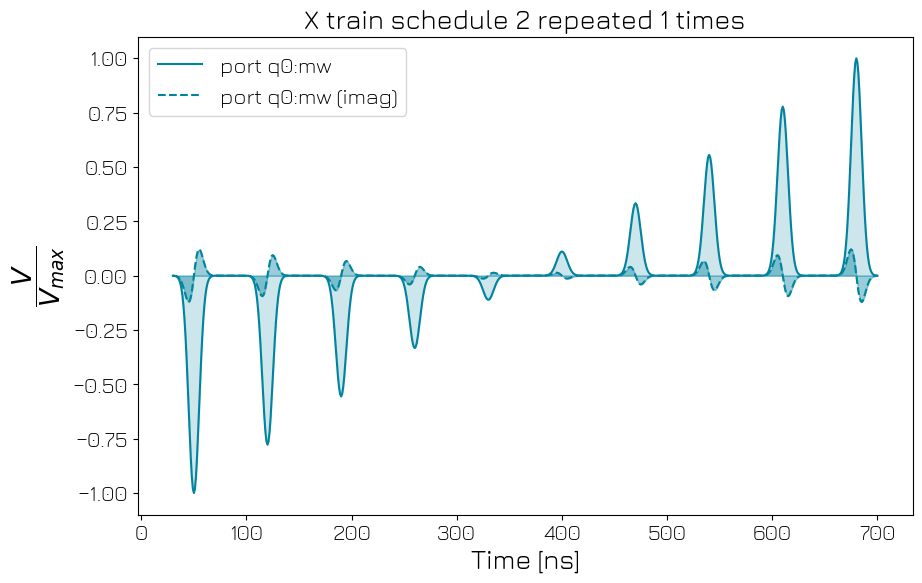
As you can see, the amplitude of the pulse (which was compiled from the X gate) changes.
Attention: A few device element parameter names do not correspond to the device_overrides key names. The integration_time of device elements can be overridden with the "acq_duration" key. These discrepancies are rare; in all cases the device element’s factory_kwargs must be used in the already generated compilation config.