

Synchronization and Feedback#
The Cluster includes embedded communication features that simplify its modular architecture. These signals are transmitted through the mainframe backplane, enabling communication between internal modules (e.g., SYNQ, LINQ) as well as with external systems via the CMM (e.g., Ethernet, Trigger). The following block diagram illustrates these communication paths and protocols.
Block Diagram#

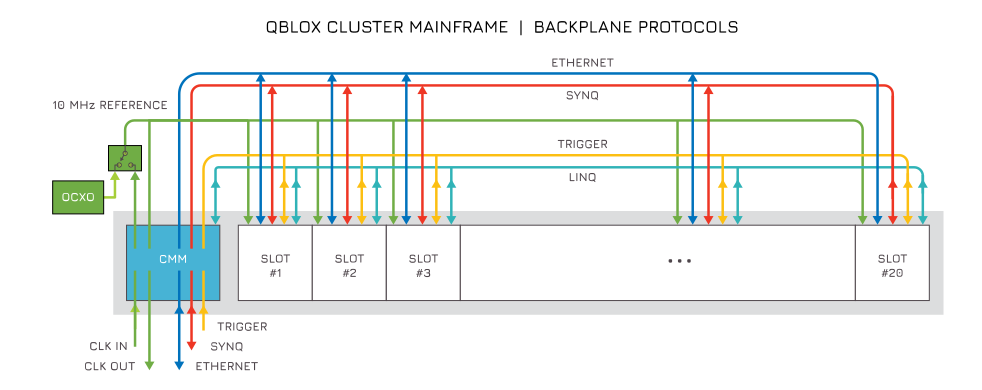
Synchronization#
This section explains how to synchronize multiple instruments in a setup, including Qblox instruments. Synchronization relies on two main aspects:
A shared reference clock, preferably phase aligned, so that all instruments use the same reference to base their operations on.
A synchronized start event, so that all instruments start their operations simultaneously.
Reference clock#
Like most instruments, Qblox instruments use a 10 MHz clock as a time reference. To synchronize multiple instruments in
your setup, this reference clock must be connected to the REF in SMA connector of all Cluster CMM modules (10 MHz, 1
Vpp nominal @ 50 Ω) (see the RF Cluster and DC Cluster user
guides). In addition, the Cluster.reference_source parameter must be set to external.
The reference clock is typically distributed using a star configuration, where the output from the external clock is
split into as many signals as there are clusters. These signals should be delivered through cables of equal length to
ensure proper synchronization before being connected to the REF in SMA connector of each Cluster.
Warning
Daisy-chaining the reference clock from one Qblox CMM module to the next is not supported. This does not yield a synchronized system with any reasonable or specified cable length.
SYNQ#
To synchronize the start event of the instruments, Qblox SYNQ technology can be used to greatly simplify the process.
All modules within a cluster share the same SYNQ network. Clusters can also be daisy-chained to each other to share the
same SYNQ network using the SYNQ cable. Additionally, the Sequencer.sync_en parameter needs to be set for every
sequencer in the instrument participating in the experiment and these same sequencers need to start their program with
the wait_sync instruction (see section Real-time Instructions).
Note
In the case of a single Qblox instrument, the same procedure applies, except the Cluster.reference_source parameter should be set to internal. The Qblox SYNQ technology will then automatically align the timing of all participating sequencers within the instrument to within 300 ps of one another.
Feedback#
Qblox instruments support two types of real-time feedback, each suited to different latency and data requirements. The appropriate type depends on the data payload and latency requirements of the experiment.
Trigger-based feedback: Uses the integrated backplane trigger network to send binary trigger signals between sequencers with low latency. See Feedback Trigger Handling for details.
LINQ-based feedback: Uses the LINQ protocol to share richer data payloads (thresholded bits, IQ values, time-tags, and more) between sequencers in real time. See LINQ-Based Feedback for details.
External Triggering#
If desired, the Qblox instruments can also be triggered by other instruments using an external trigger signal. To
achieve this, simply connect the external trigger signal to the TRIG in SMA connector (0–3.3 V, high-Z). See the user
guide page for trigger handling for details.