For a high-level overview of both feedback mechanisms available in the Cluster, see
Synchronization and Feedback.
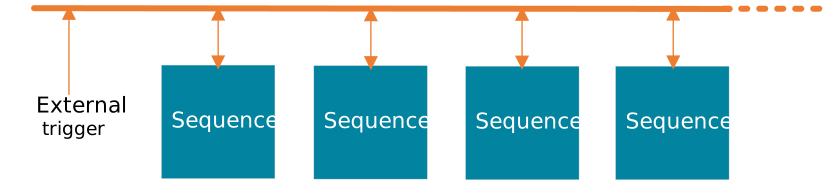
Qblox instruments support feedback by using an integrated trigger network of four parallel trigger lines (15 addresses)
that interconnect all sequencers within the system and allow the user to create low-latency feedback sequences.
Additionally, the external trigger input on each instrument is connected to the same trigger network. This allows other
instruments to also contribute to any feedback sequence. The feedback works from any sequencer in any readout module to
any sequencer in any module.
The trigger network uses 4 lines on the backplane to transmit the triggers. These lines map to 15 trigger addresses.
Once a trigger is sent from any source, all sequencers will receive it simultaneously 212 ns later. Only one trigger may
be sent over the backplane at once. After 252 ns, the network is ready for another trigger.
All Q1 sequencer can be configured to send a trigger to the backplane due to different events. These events are
different for the different types of sequencers and are described in the specific sequencer pages
(control, readout and timetag).
Additionally, every Q1 sequencer can receive triggers from the backplane in order to run instructions conditioned on the
state of the triggers. A sequencer can either wait for a trigger on a particular address, or execute real-time
instructions conditionally based on a condition. Both of these methods are described below.
The figure above illustrates the different timing contributions within the instrument. OP and IP represent the output
path and input path latencies, respectively. These latencies depend on several factors, including the sequencer type
(Control Sequencers , Readout Sequencers, Timetag Sequencers) as well as any options enabled on the
path (e.g., NCO, RTP). For most modules with base options, the combined base latency is OP + IP = 149 ns.
The propagation delay refers to the time required for the signal to travel from the output to the input through external
cabling. This delay is experiment-dependent; in the data below it is assumed to be 0 ns. The trigger network itself
introduces an additional latency of 212–239 ns, depending on when the message is sent relative to the trigger clock.
In total, the feedback time, defined as the duration from the last input sample received to the first output sample
sent, is given by:
To help you understand how latency behaves across different sequencer types and configuration options, we’ve separated
the information into two tables. The first table shows the base latency values for each sequencer, distinguishing
between output and input paths where applicable. This represents the latency without any optional features enabled.
The second table lists the latency modifications introduced by specific options such as RTP, Marker, and TTL. These
values represent the change (increase or decrease) from the base latency. Not all options apply to every sequencer or
latency direction, so we indicate “N/A” where an option is not applicable.
The figure below shows the four-line trigger network connecting the external trigger input and all sequencers. Access to
this trigger network is address-based. When triggering the network using the external trigger input or any of the
sequencers, the resulting trigger is converted into one of fifteen configurable addresses (i.e. 1 to 15). In turn, any
sequencer can subscribe to one or multiple addresses and react to those incoming triggers using custom sequencer
instructions to modify sequence flow (see section sequence_processor_operation_instructions).
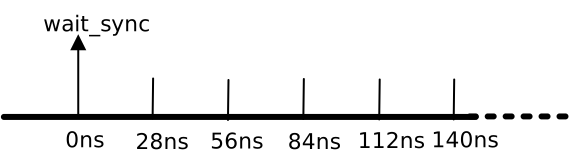
The trigger network operates on a 28 ns timegrid. This timegrid is started/aligned during module synchronization using
the wait_sync instruction. Once synchronized, triggers are sent to the nearest timegrid point in the future. In other
words, triggers that are not sent on this timegrid get a maximum time penalty of 24 ns. Any trigger that is sent on the
trigger network takes 212 ns to propagate to any receiver on the trigger network, and be available for conditional
operation. A trigger can be sent on the trigger network once every 252 ns (or 9 timegrid points). The figure below shows
an example of the trigger network timegrid.
Sending triggers on the trigger network can be done via different instructions described below.
Using the threshold trigger via QCoDeS
For debugging purposes you can enable the threshold-trigger via QCoDeS (thresholded_acq_marker_en(True)). This feature
causes the sequencer to issue a marker pulse independent of the standard trigger network each time the acquisition
threshold is exceeded.
Because the threshold-acquisition marker is generated on a 4 ns time grid while most Qblox Q1 sequencer instructions
run on a 1 ns time grid, the marker can only appear at multiples of 4 ns. To guarantee the marker is raised exactly
when the acquisition finishes, the acquisition end time must be aligned to the 4 ns grid.
If the acquisition finishes at a time that is not divisible by 4 ns, the marker will be delayed until the next 4 ns
tick. That introduces an additional timing offset of 1–3 ns, which combined with the instrument’s base input path
latency may produce measured latencies such as 131 ns, 132 ns, 133 ns or 134 ns in practice.
The wait_trigger<trigger_address> instruction stops the RT core until a trigger arrives to the sequencer at the
specified address.
Warning
This means that the time required to execute a wait_trigger instruction is not deterministic.
Example: wait_trigger
Here is a program that plays a 1 us square pulse, then waits for a trigger on address 5. Once the sequencer receives the trigger, it then plays a short 100 ns square pulse. This program works on either a control or readout sequencer.
set_awg_offs32767,32767# Play 1 us square pulse.upd_param1000set_awg_offs0,0upd_param4wait_trigger5# Wait for a trigger from any source on trigger address 5.set_awg_offs32767,32767# Play 100 ns square pulse.upd_param100set_awg_offs0,0upd_param4stop
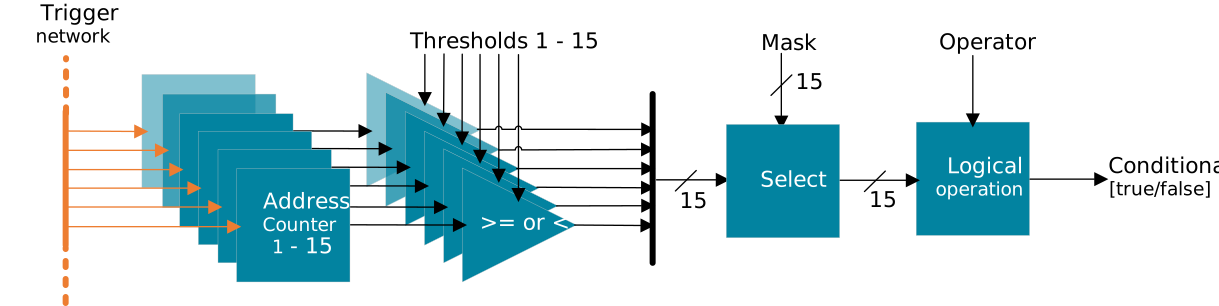
Every sequencer has a trigger handling module which counts the number of triggers arriving at each trigger address and
computes the boolean result of a condition that is configurable using the set_cond instruction.
The set_cond instruction is a Q1 core instruction that changes how real-time instructions are executed. The set_cond
instruction takes 4 arguments: enable, mask, operator and else_time. A boolean condition is calculated before
the RT core executes every real-time instruction. If the condition is true, the instruction is executed. If the
condition is false, the RT core simply waits for else_time ns before moving on to the next real-time instruction in
the queue.
Here is a description of the arguments to the set_cond instruction:
The enable argument can be either 1 or 0 and either enables or disables conditional execution.
The mask argument sets the 15 bit mask as described below.
The operator argument sets the operator to one of 6 as described below.
The else_time argument sets how long the RT core will wait after skipping execution of the real-time instruction if
the condition is false.
The block diagram below followed by an explanation of how the boolean condition is determined.
Address Counters: The trigger handling module consists of 15 counters that count the number of triggers that arrive
at each of the 15 trigger addresses. These counters can be activated and deactivated using the latch_en
instruction. The counters can be reset to zero using the latch_rst instruction.
Thresholds A threshold value can be set for each of the trigger address counters using
Sequencer.trigger1_count_threshold() parameter. Each counter is individually compared (>=) with its
associated threshold. The Sequencer.trigger1_threshold_invert() parameter can be used to invert this
comparison to (<). The results of these static comparisons create a thresholds vector of boolean values with a
true/false indication for each trigger address.
Mask and operator A 15 bit mask (specified as either a decimal number: 72 or a hexadecimal number: 0x48) can be
set using the second argument of the set_cond instruction. The 15 bit boolean thresholds vector and the 15 bit
mask are combined using one of 6 different operations described in the table below to give one boolean value.
Argument
Select
Operator
Comment
0
AND mask
OR
Return true if any of the selected counters crossed their thresholds
1
AND mask
NOR
Return true if none of the selected counters crossed their threshold
2
OR NOT(mask)
AND
Return true if all of the selected counters crossed their threshold
3
OR NOT(mask)
NAND
Return true if any of the selected counters did not cross their threshold
4
AND mask
XOR
Return true if an odd number of selected counters crossed their threshold
5
AND mask
XNOR
Return true if an even number of selected counters crossed their threshold
Example: set_cond
Here is a program that plays a 1 us square pulse, then plays a 100 ns pulse only if a trigger is received on trigger address 1 and 5. If the trigger is not received, it waits for 2 us and continues with the program. This program works on either a control or readout sequencer.
# Play 1 us square pulseset_awg_offs32767,32767upd_param1000set_awg_offs0,0upd_param4# Configure set_cond# Set the condition with these arguments:# enable: Enable conditional execution# mask: Set the mask to 000000000010001 (triggers 1 and 5)# operator: Set the operator to thresholds vector OR NOT(mask)# else_time: If condition is false, wait 1000 ns for every real-time instructionset_cond1,0x0011,2,1000# Play 100 ns square pulseset_awg_offs32767,32767# Classical instruction: Always executed by Q1 core.upd_param100# Real-time instruction: Evaluate condition. Execute if condition is true. Else wait 1 us.set_awg_offs0,0# Classical instruction: Always executed by Q1 core.upd_param4# Real-time instruction: Evaluate condition. Execute if condition is true. Else wait 1 us.stop