

See also
A Jupyter notebook version of this tutorial can be downloaded here.

PSB Readout#
Tutorial Objective#
The objective of this tutorial is to demonstrate how to perform the Pauli Spin Blockade (PSB) readout on a double quantum dot system. For further information on this readout method, see Barthel.2009.
Imports
[1]:
from __future__ import annotations

from dependencies.psb import OperatingPoints, PsbEdge

from qblox_scheduler import (
    HardwareAgent,
    Measure,
    PulseCompensation,
    RampPulse,
    Schedule,
    SquarePulse,
)
Hardware/Device Configuration Files#
We use configuration files in order to describe the hardware properties (e.g. cluster ip, connected modules, output ports) and quantum device properties (charge sensors, qubits, barriers and their associated properties) in one accessible location, respectively. Check the Getting Started Guide for further information.
Based on the information specified in these files, we establish the hardware and device configurations that determine the system’s connectivity.
[2]:
from qblox_applications.qblox_scheduler.spin.device_element.spin_element import (  # noqa: F401 (needed by configs)
    BasicSpinElement,
    ChargeSensor,
)

hw_config_path = "dependencies/configs/tuning_spin_coupled_pair_hardware_config.json"
device_path = "dependencies/configs/spin_with_psb_device_config_2q.yaml"
Experimental Setup#
In order to run this application example, you will need a quantum device that consists of a double quantum dot array (q0 and q1), with a charge sensor (cs0) connected to reflectometry readout. The DC voltages of the quantum device also need to be properly tuned. For example, reservoir gates need to be ramped up for the accumulation devices. The charge sensor can be a quantum dot, quantum point contact (QPC), or single electron transistor (SET).
Hardware Setup#
The HardwareAgent() is the main object for Qblox experiments. It provides an interface to define the quantum device, set up hardware connectivity, run experiments, and receive results. For more information about the HardwareAgent() you can check the Core concepts of qblox-scheduler page.
[3]:
hw_agent = HardwareAgent(hw_config_path, device_path)
hw_agent.connect_clusters()

# Device name string should be defined as specified in the hardware configuration file
sensor_0 = hw_agent.quantum_device.get_element("cs0")
qubit_0 = hw_agent.quantum_device.get_element("q0")
qubit_1 = hw_agent.quantum_device.get_element("q1")
hw_opts = hw_agent.hardware_configuration.hardware_options
cluster = hw_agent._clusters["cluster0"].cluster
/.venv/lib/python3.14/site-packages/qblox_scheduler/qblox/hardware_agent.py:603: UserWarning: cluster0: Trying to instantiate cluster with ip 'None'.Creating a dummy cluster.
  warnings.warn(
As can be observed from the defined quantum devices and the hardware connectivies of these elements, the relevant modules and connections for this tutorial are:
QCM (Module 2):
\(\text{O}^{1}\): Gate connection line for qubit 0 (
q0).\(\text{O}^{2}\): Gate connection line for qubit 1 (
q1).
QRM (Module 4):
\(\text{O}^{1}\) and \(\text{I}^{1}\): Charge sensor (
cs0) resonator probe and readout connection.\(\text{O}^{2}\) : Charge sensor (
cs0) plunger gate connection.
PSB Readout#
In order to apply PSB Readout in a concise and readable manner, we implement a custom defined ‘’’Edge’’’ that is configured for this purpose. For details on how to configure such a custom device element or edge, see the Make Your Own Device Elements tutorial.
[4]:
q0_q1 = PsbEdge(qubit_0, qubit_1)

q0_q1.control.target_gate_voltage = 0.1
q0_q1.control.ancilla_gate_voltage = -0.2
q0_q1.control.barrier_gate_voltage = 0.3

q0_q1.readout.target_gate_voltage = 0.0
q0_q1.readout.ancilla_gate_voltage = 0.0
q0_q1.readout.barrier_gate_voltage = 0.0

hw_agent.quantum_device.add_edge(q0_q1)
We further introduce two helper functions to be able to move along or hold at certain points of the charge stability diagram:
``ramp`` Creates a schedule that smoothly ramps the voltages from one operating point to another using
RampPulse. The duration of the ramp is determined by theRampingTimessubmodule of thePSBEdge.``hold`` Creates a schedule that holds the system at a given operating point for a fixed duration using
SquarePulse. This is useful when you want to keep the system stable at a specific bias point (e.g., during readout).
Both functions loop over the parameters defined in the operating points (e.g. control and readout points and both for qubits and barrier gates), fetch the corresponding hardware ports, and then generate the appropriate pulses. This further helps with readability and streamlining of the generated schedules, which are expected to include PSB Readout quite frequently.
[5]:
def ramp(op_start: OperatingPoints, op_end: OperatingPoints) -> Schedule:
    """Generate a schedule to ramp gate voltages between two PSB operating points."""
    parent = op_start.parent
    port_dict = parent.port_dict
    ramp_time = parent.ramps.to_dict()[f"{op_start.name}_to_{op_end.name}"]

    ops = op_start.to_dict()
    ope = op_end.to_dict()

    sched = Schedule("")
    ref_op = None
    for key in op_start.parameters:
        amplitude = ope[key] - ops[key]
        offset = ops[key]
        ref_op = sched.add(
            RampPulse(
                amplitude=amplitude, voltage_offset=offset, duration=ramp_time, port=port_dict[key]
            ),
            ref_pt="start",
            ref_op=ref_op,
        )
    return sched


def hold(op_point: OperatingPoints, duration: float) -> Schedule:
    """Generate a schedule to hold gate voltages at a given PSB operating point."""
    parent = op_point.parent
    port_dict = parent.port_dict

    sched = Schedule("")
    ref_op = None
    for key in op_point.parameters:
        ref_op = sched.add(
            SquarePulse(amplitude=op_point.to_dict()[key], duration=duration, port=port_dict[key]),
            ref_pt="start",
            ref_op=ref_op,
        )
    return sched
PSB Readout - Schedule & Measurement#
Using the PSBEdge and the helper functions defined above, we generate a compact schedule for implementing a PSB Readout experiment.
We define all variables for the experiment schedule in one location for ease of access and modification.
[6]:
sensor = sensor_0
[7]:
schedule = Schedule(
    ""
)  # Define an schedule to be given as a body to the pulse compensated schedule. This schedule will include the bulk of the experiment.
psb_readout_schedule = Schedule("Pulse Compensated Schedule")

schedule.add(ramp(q0_q1.readout, q0_q1.control))
schedule.add(hold(q0_q1.control, 200e-9))
schedule.add(ramp(q0_q1.control, q0_q1.readout))
ref_pulse_measure = schedule.add(hold(q0_q1.readout, sensor.measure.pulse_duration))
schedule.add(Measure(sensor.name), ref_op=ref_pulse_measure, ref_pt="start")
psb_readout_schedule.add(
    PulseCompensation(
        schedule,
        max_compensation_amp={
            "q0:gt": 0.110,
            "q1:gt": 0.120,
            "q0_q1:gt": 0.09,
            "cs0:gt": 0.09,
        },
        time_grid=4e-9,
        sampling_rate=1e9,
    )
)
[7]:
{'name': 'ee9141d7-a1f4-47f6-a529-faf2cc31e9ba', 'operation_id': '121334626627408334', 'timing_constraints': [TimingConstraint(ref_schedulable=None, ref_pt=None, ref_pt_new=None, rel_time=0)], 'label': 'ee9141d7-a1f4-47f6-a529-faf2cc31e9ba'}
Now, we will run the schedule. See the documentation on the QRM Module and Readout Sequencers for information on how the signal is processed upon acquisition.
[8]:
psb_readout_ds = hw_agent.run(psb_readout_schedule)
psb_readout_ds
[8]:
<xarray.Dataset> Size: 16B
Dimensions:      (acq_index_0: 1)
Coordinates:
  * acq_index_0  (acq_index_0) int64 8B 0
Data variables:
    0            (acq_index_0) float64 8B nan
Attributes:
tuid: 20261015-135825-063-dce067You may plot the pulse diagram of a schedule for verification.
[9]:
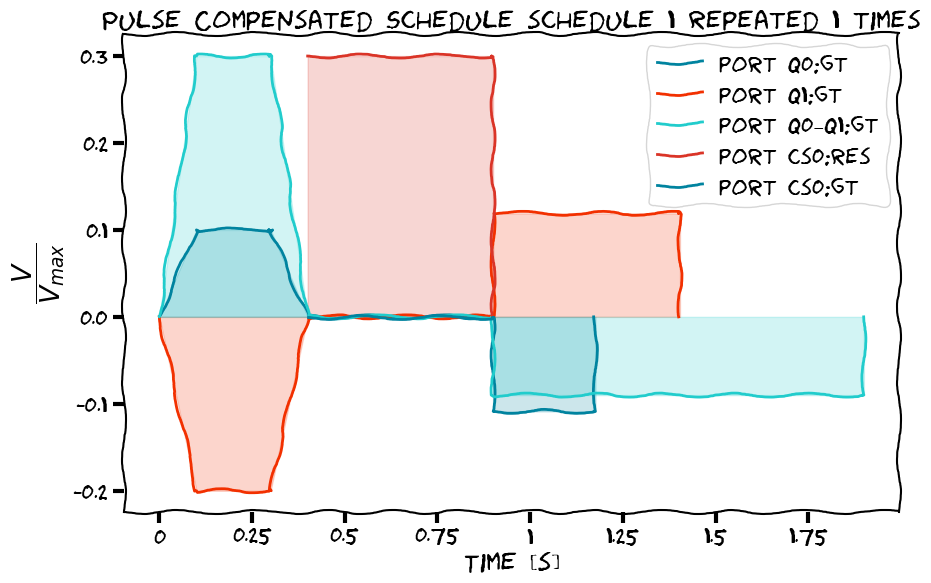
hw_agent.compile(psb_readout_schedule).plot_pulse_diagram()
[9]:
(<Figure size 1000x621 with 1 Axes>,
 <Axes: title={'center': 'schedule repeated 1 times (1 shown)'}, xlabel='Time [μs]', ylabel='$\\dfrac{V}{V_{max}}$'>)
findfont: Failed to find font weight 300 for STIXGeneral, now using 400.
findfont: Failed to find font weight 300 for STIXGeneral, now using 400.
findfont: Failed to find font weight 300 for STIXNonUnicode, now using 400.
findfont: Failed to find font weight 300 for STIXNonUnicode, now using 400.
findfont: Failed to find font weight 300 for STIXSizeOneSym, now using 400.
findfont: Failed to find font weight 300 for STIXSizeTwoSym, now using 400.
findfont: Failed to find font weight 300 for STIXSizeThreeSym, now using 400.
findfont: Failed to find font weight 300 for STIXSizeFourSym, now using 400.
findfont: Failed to find font weight 300 for STIXSizeFiveSym, now using 400.
findfont: Failed to find font weight 300 for cmmi10, now using 400.
findfont: Failed to find font weight 300 for cmsy10, now using 400.
findfont: Failed to find font weight 300 for cmr10, now using 400.
findfont: Failed to find font weight 300 for cmtt10, now using 400.
findfont: Failed to find font weight 300 for cmti10, now using 400.
findfont: Failed to find font weight 300 for cmb10, now using 400.
findfont: Failed to find font weight 300 for cmss10, now using 400.
findfont: Failed to find font weight 300 for cmex10, now using 400.
findfont: Failed to find font weight 300 for DejaVu Sans, now using 400.
findfont: Failed to find font weight 300 for DejaVu Sans, now using 400.
findfont: Failed to find font weight 300 for DejaVu Sans Mono, now using 400.
findfont: Failed to find font weight 300 for DejaVu Sans Display, now using 400.
The quantum device settings can be saved after every experiment for allowing later reference into experiment settings.
[10]:
hw_agent.quantum_device.to_json_file("./dependencies/configs", add_timestamp=True)
[10]:
'./dependencies/configs/spin_with_psb_device_config_2026-10-15_13-58-25_UTC.json'