

See also
A Jupyter notebook version of this tutorial can be downloaded here.
Manual Mixer calibration#
The Cluster RF Modules (QCM-RF and QRM-RF) have integrated IQ mixers that handle both upconversion and downconversion of RF signals. These mixers use a local oscillator (LO) with a frequency of \(\omega_{LO}\). During upconversion, they combine signals from the I and Q paths, which have a frequency of \(\omega_{NCO}\), resulting in an output signal at \(\omega_{LO} + \omega_{NCO}\). However, due to the inherent mathematical imperfections of IQ mixers, the output also includes an unwanted signal at \(\omega_{LO}\) (known as leakage) and another at \(\omega_{LO} - \omega_{NCO}\) (called the undesired sideband). Cluster baseband modules (QCM and QRM) can be used with external mixers, which have similar imperfections.
In this tutorial, we are going to look at ways to suppress the LO leakage and undesired sideband. This process is called mixer calibration.
To run this tutorial optimally, you will need:
Spectrum analyzer
SMA-cables
Installation and enabling of ipywidgets:
pip install ipywidgets
jupyter nbextension enable --py widgetsnbextension
Setup#
First, we are going to import the required packages.
[1]:
from __future__ import annotations

import json

import ipywidgets as widgets
from ipywidgets import interact
from qcodes.instrument import find_or_create_instrument

from qblox_instruments import Cluster, ClusterType
Scan For Clusters#
We scan for the available devices connected via ethernet using the Plug & Play functionality of the Qblox Instruments package (see Plug & Play for more info).
!qblox-pnp list
[2]:
cluster_ip = "10.10.200.42"
cluster_name = "cluster0"
Connect to Cluster#
We now make a connection with the Cluster.
[3]:
cluster: Cluster = find_or_create_instrument(
    Cluster,
    recreate=True,
    name=cluster_name,
    identifier=cluster_ip,
    dummy_cfg=(
        {
            2: ClusterType.CLUSTER_QCM,
            4: ClusterType.CLUSTER_QRM,
            6: ClusterType.CLUSTER_QCM_RF,
            8: ClusterType.CLUSTER_QRM_RF,
            10: ClusterType.CLUSTER_QTM,
            12: ClusterType.CLUSTER_QRC,
            16: ClusterType.CLUSTER_QSM,
        }
        if cluster_ip is None
        else None
    ),
)

cluster.reset()
print(cluster.get_system_status())
Status: ERROR, Flags: FEEDBACK_NETWORK_CALIBRATION_FAILED, Slot flags: NONE
Get connected modules#
[4]:
# QRM-RF modules
modules = cluster.get_connected_modules(lambda mod: mod.is_qrm_type and mod.is_rf_type)
[5]:
# This uses the module of the correct type with the lowest slot index
module = list(modules.values())[0]
We upload a simple sequence program that keeps playing the DC waveform at 30 percent IF power (waveform amplitude = 0.3). This will be modulated and upconverted within the QRM-RF before outputting.
[6]:
# Sequence program.
seq_prog = """
      wait_sync 4

loop: play    0,0,1200
      jmp     @loop
"""
waveforms = {"dc": {"data": [0.3 for i in range(0, 1200)], "index": 0}}

# Add sequence to single dictionary and write to JSON file.
sequence = {
    "waveforms": waveforms,
    "weights": {},
    "acquisitions": {},
    "program": seq_prog,
}
with open("sequence.json", "w", encoding="utf-8") as file:
    json.dump(sequence, file, indent=4)
    file.close()

module.sequencer0.sequence("sequence.json")
Let’s configure the sequencer to generate an IF frequency of \(100\) MHz. To get an output frequency of \(5.0\) GHz, we then have to configure the LO to run at \(4.9\) GHz.
[7]:
lo_freq = 4.9e9
module.out0_in0_lo_freq(lo_freq)
[8]:
nco_freq = 100e6
module.sequencer0.marker_ovr_en(True)
module.sequencer0.marker_ovr_value(3)  # Enables output on QRM-RF

# Configure the sequencer
module.sequencer0.mod_en_awg(True)
module.sequencer0.nco_freq(nco_freq)
module.sequencer0.sync_en(True)

module.arm_sequencer(0)
module.start_sequencer(0)

print(module.get_sequencer_status(0))
Status: OKAY, State: RUNNING, Exit Code: 0, Info Flags: NONE, Warning Flags: NONE, Error Flags: NONE, Log: []
Connect the output of the QRM-RF (O1) to the spectrum analyzer. This is what the output looks like on the spectrum analyzer (center frequency at 4.85 GHz with 600 MHz bandwidth). We see three peaks which correspond to (from the right) 5 GHz (desired signal), 4.9 GHz (LO Leakage) and 4.8 GHz (unwanted sideband).
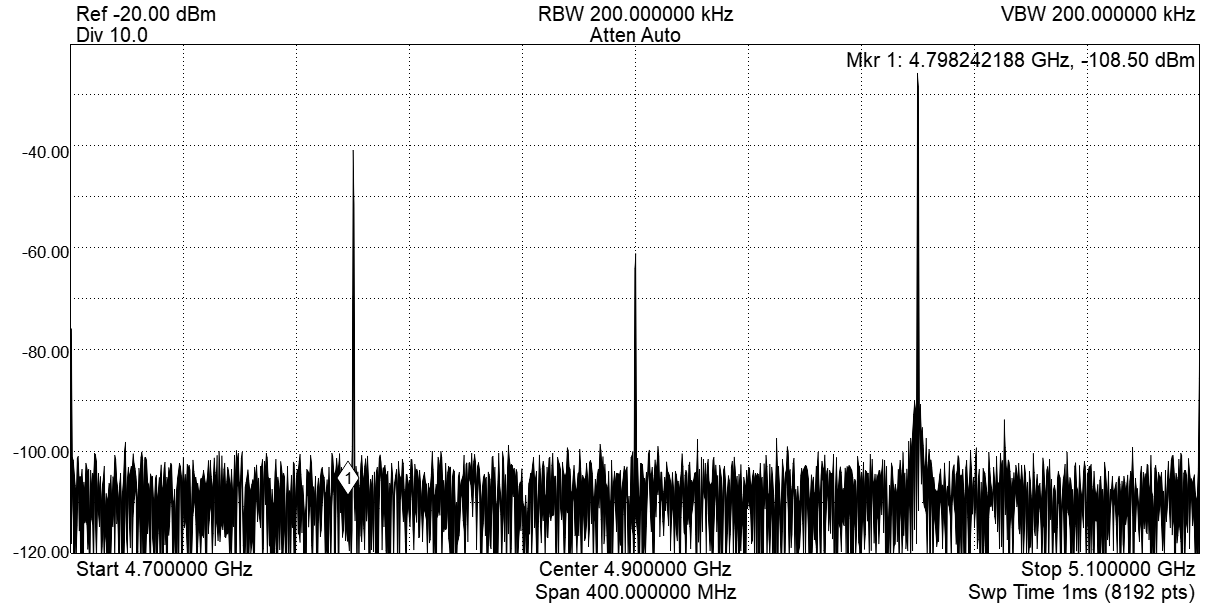
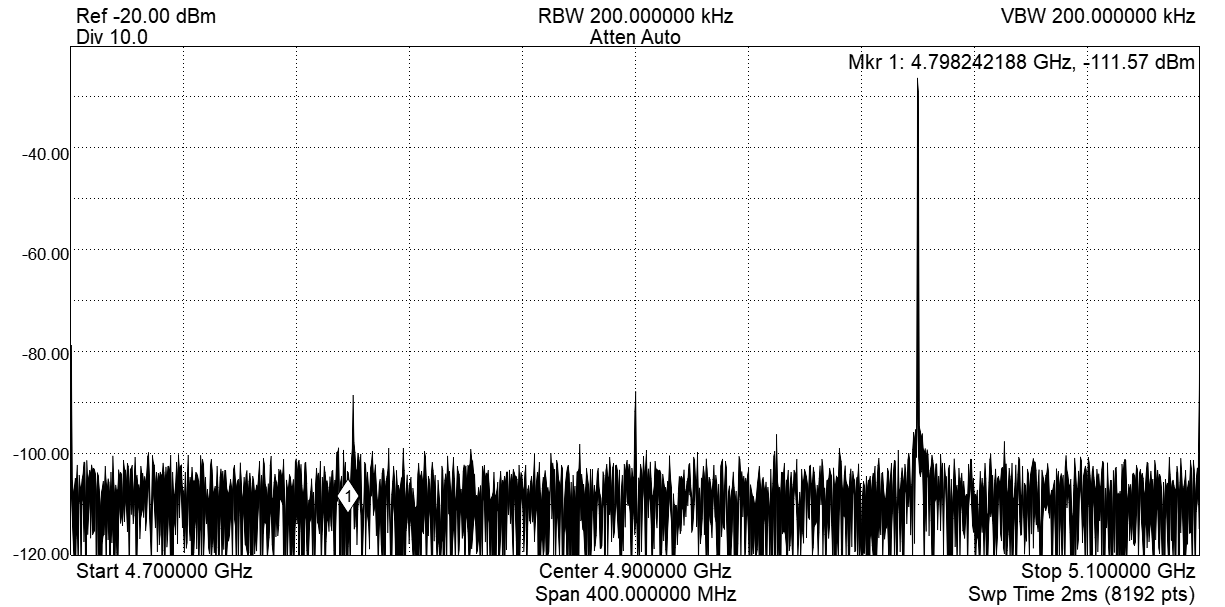
To get better spurious free dynamic range (SFDR) and better suppression, we can manually calibrate the mixer by:
Using DC offsets we can lower the LO leakage.
By changing the gain ratio and phase of the IF signal we can cancel the unwanted sideband.
Create control sliders for these parameters. Each time the value of a parameter is updated, the sequencer is automatically stopped from the embedded firmware for safety reasons and has to be manually restarted. The sliders cover the valid parameter range. If the code below is modified to input invalid values, the Cluster QRM-RF firmware will not program the values.
Execute the code below, move the sliders and observe the result on the spectrum analyzer.
[9]:
def set_offset0(offset0: float) -> None:
    module.out0_offset_path0(offset0)
[10]:
def set_offset1(offset1: float) -> None:
    module.out0_offset_path1(offset1)
[11]:
def set_gain_ratio(gain_ratio: float) -> None:
    module.sequencer0.mixer_corr_gain_ratio(gain_ratio)
    # Start
    module.arm_sequencer(0)
    module.start_sequencer(0)


def set_phase_offset(phase_offset: float) -> None:
    module.sequencer0.mixer_corr_phase_offset_degree(phase_offset)
    # Start
    module.arm_sequencer(0)
    module.start_sequencer(0)


interact(
    set_offset0,
    offset0=widgets.FloatSlider(
        min=-14.0,
        max=14.0,
        step=0.001,
        start=0.0,
        layout=widgets.Layout(width="1200px"),
    ),
)
interact(
    set_offset1,
    offset1=widgets.FloatSlider(
        min=-14.0,
        max=14.0,
        step=0.001,
        start=0.0,
        layout=widgets.Layout(width="1200px"),
    ),
)
interact(
    set_gain_ratio,
    gain_ratio=widgets.FloatSlider(
        min=0.9, max=1.1, step=0.001, start=1.0, layout=widgets.Layout(width="1200px")
    ),
)
interact(
    set_phase_offset,
    phase_offset=widgets.FloatSlider(
        min=-45.0,
        max=45.0,
        step=0.001,
        start=0.0,
        layout=widgets.Layout(width="1200px"),
    ),
)
[11]:
<function __main__.set_phase_offset(phase_offset: 'float') -> 'None'>
Stop#
Finally, let’s stop the sequencers if they haven’t already and close the instrument connection. One can also display a detailed snapshot containing the instrument parameters before closing the connection by uncommenting the corresponding lines.
[12]:
# Stop all sequencers.
module.stop_sequencer()

# Print status of sequencers 0 and 1 (should now say it is stopped).
print(module.get_sequencer_status(0))
print(module.get_sequencer_status(1))
print()
Status: OKAY, State: STOPPED, Exit Code: 0, Info Flags: FORCED_STOP, Warning Flags: NONE, Error Flags: NONE, Log: []
Status: OKAY, State: STOPPED, Exit Code: 0, Info Flags: NONE, Warning Flags: NONE, Error Flags: NONE, Log: []